Workflow Automation for People Who Don’t Build Automation
This work focused on making automated website scanning more useful for the people actually responsible for maintaining public websites.
Many site teams do not have engineers. They are often made of communications specialists, program staff, or other operators who need clear answers to simple questions:
- what is broken?
- where is it?
- how serious is it?
- what should I do next?
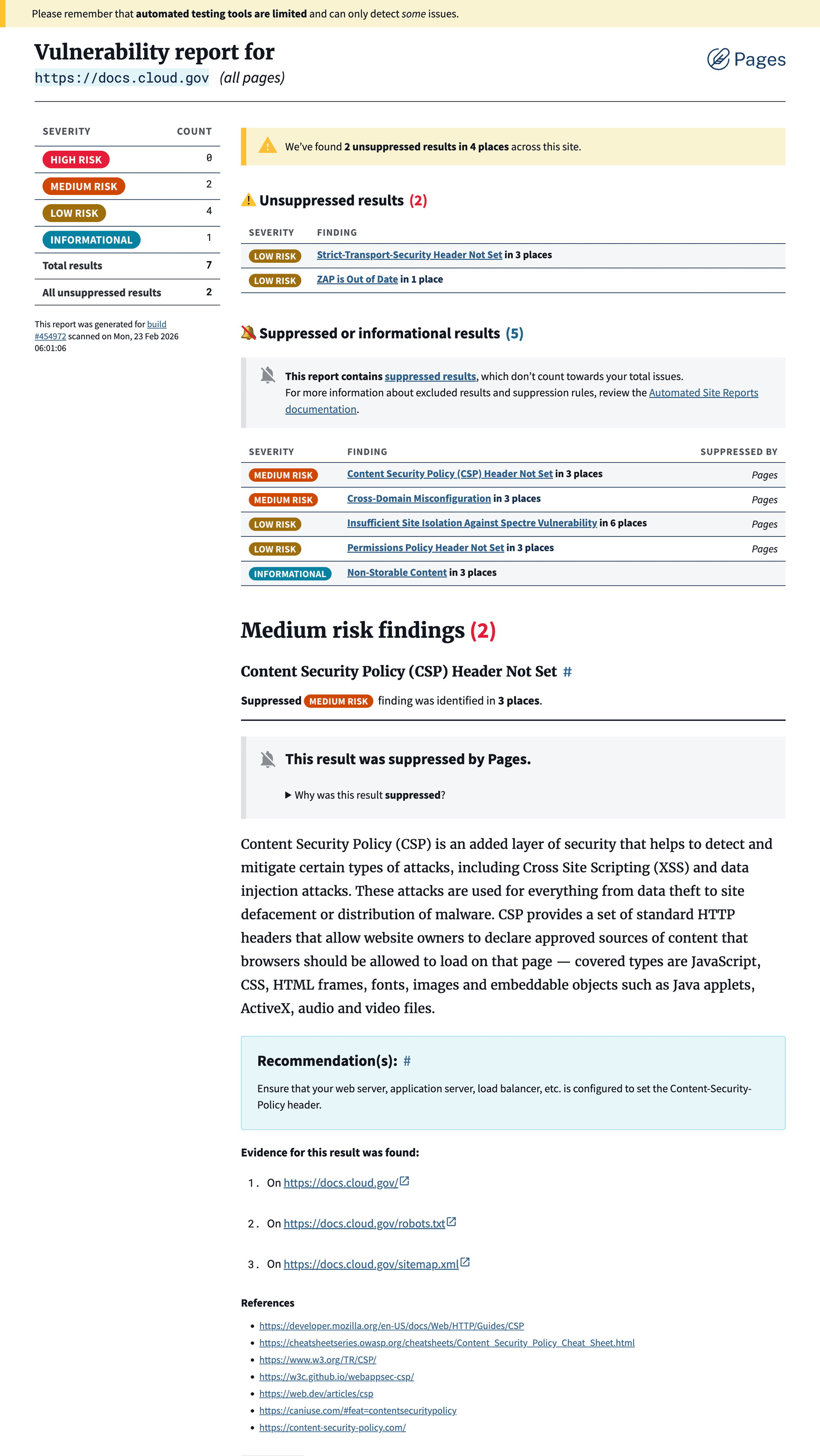
The project translated raw outputs from accessibility and security scanners into a more understandable reporting experience inside cloud.gov Pages.
Platform
cloud.gov Pages gives teams who want the reliability and compliance posture of enterprise‑class infrastructure without having to build and operate it themselves. This feature extended the platform by making compliance and maintenance workflows more approachable for these teams.
Value proposition
The sites these teams maintain should be checked regularly for things like WCAG violations or common web vulnerabilities. The tools that detect website issues are built for engineers. Setting them up typically involves CI pipelines, deployment credentials, configuration files, and a nuanced understanding of their outputs. The value of this work was making complex scans actionable for non-specialists.
It helped by:
- reducing the setup and interpretation burden of scanning tools
- turning raw scanner output into clearer findings
- making accessibility and security issues easier to review in one interface
- helping teams focus on the issues they could actually fix
Previous State
Teams were either procuring expensive contracts to do it for them or left to figure out how to run and interpret these scans themselves. Most scanning tools return long lists of rule violations tied to standards-specific success criteria. Security and vulnerability reports are even harder to read. An OWASP ZAP report, for example, is extremely thorough but nearly impossible to understand unless you already know what you’re looking for.
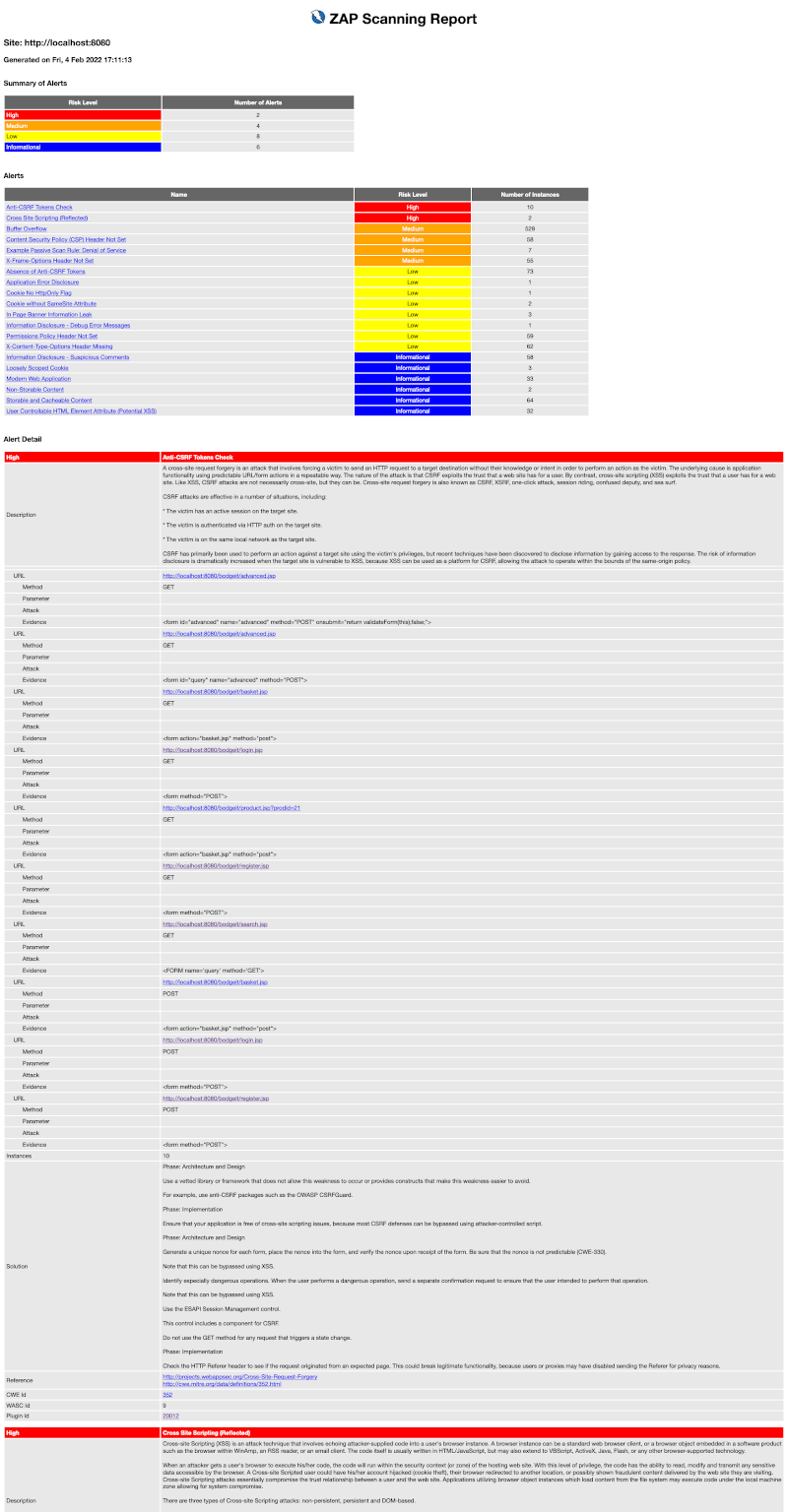
When customer teams were able to run the scans, they still had trouble answering: what’s broken, where is it, and how do I fix it?
If nearly every team on our platform has to solve the same problem, that’s the opportunity and responsibility we have to fix it once, for everyone.
The Opportunity
The core challenge was that accessibility and security scanners describe problems in very different ways, but site maintainers need a single, simple workflow.
1. One report structure for two very different scanners
axe-core starts from accessibility rules and failed page elements. ZAP starts from suspicious site behavior and potential vulnerabilities. We translated both into the same finding model so users did not need to understand either scanner’s native output.
Each finding answers the same questions:
- what is it?
- how bad is it?
- where is it?
- what is happening?
- what should I do?
- where can I learn more?
2. A clearer model for non-specialists
The report structure normalized different scanner fields into one interface:
- title
- severity
- location
- explanation
- recommendation
- references
That let us turn scanner terminology into plain language and make findings easier to review and act on.
3. A flexible adapter layer
Each scanner feeds through a small translation layer before results appear in Pages.
That created two benefits:
- the product speaks in Pages language instead of inheriting scanner quirks
- we can replace or add scanners later without redesigning the report experience
4. Less alert fatigue, without hiding the truth
Early testing showed that teams understood the reports better, but they also worried about being overwhelmed by repeated warnings.
To solve that, we introduced suppressed findings for expected or low-value results. Those findings still appear for transparency, but they do not inflate the issue count teams use to prioritize work.
5. Reports that support ongoing maintenance
This made the reports more useful over time:
- new issues stand out
- known issues stay visible but contained
- resolved issues disappear
The result was a reporting experience that better matched how real teams maintain sites.
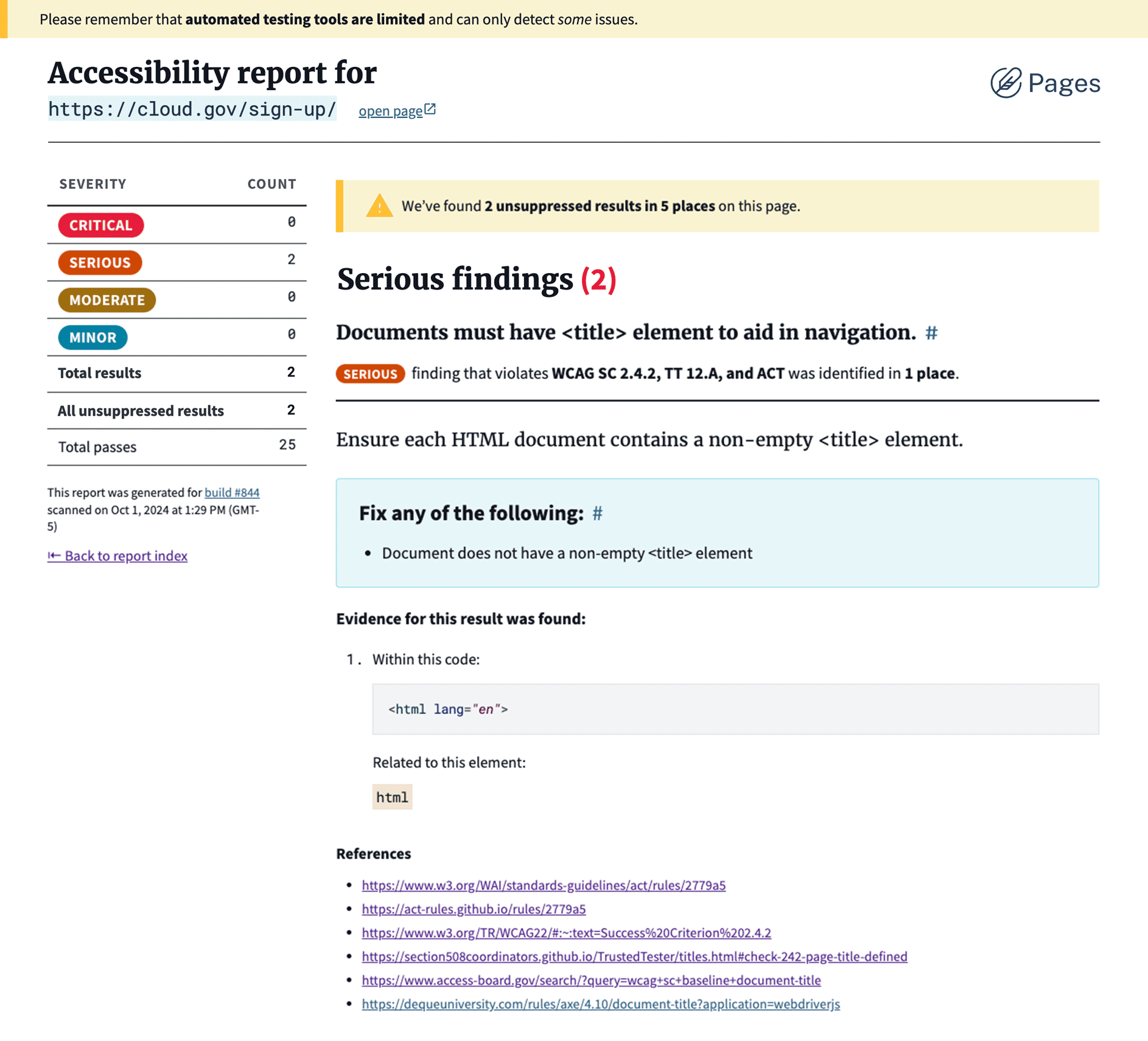
One accessibility specialist reviewing the new scans commented:
This is the most user-friendly implementation of axe-core that I know of, including commercial offerings from Level Access, Deque, and Siteimprove. It will be a game changer for Cloud.gov Pages customers to have this available.
The scanners still do the technical work behind the scenes, but the report now answers the questions maintainers actually care about: what’s broken, where should I look, and what should I fix next?
My role
I led the engineering work as part of cloud.gov Pages, helping design the architecture, define the reporting model, shape the user experience, and align the platform around the needs of real site maintainers rather than scanner internals.